


Advice and answers from the GlobalHR Q&A Team
Feature: Payment Title
Purpose:
- Define and manage named benefits received by employees in their monthly salary.
- Categorize benefits as additions, allowances, or awards/deductions.
- Control which benefits are displayed in the payment calculation form.
Key Points:
- Each Payment Title has a description and is categorized by payment type (addition, allowance, award/deduction).
- Inactive titles can be hidden.
- Additions and Allowances are recurring, while Awards/Deductions can be set for specific periods.
- Connecting Payment Titles to Payroll Rules is required for them to appear in payment calculations.
Steps:
- Accessing Payment Titles:
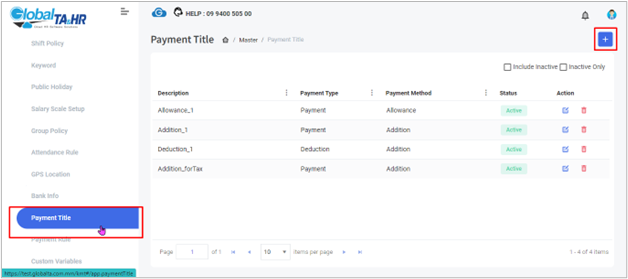
- Go to Left Menu Panel > Master (scroll down) > Click “Payment Title.”
- Creating Payment Titles:
2.1 Addition:
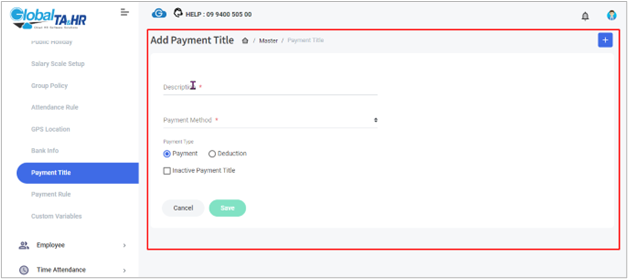
- Click “Add New.”
- Enter a descriptive name in “Description.”
- Choose “Addition” in “Payment Method.”
- Select “Payment” or “Deduction” based on the effect on salary.
- Click “Save.”
2.2 Allowance:
- Follow steps 1-3 for Addition, choosing “Allowance” in “Payment Method.”
2.3 Award & Deduction:
- Follow steps 1-3 for Addition, choosing “Award and Deduction” in “Payment Method.”
- Set the period for the award or deduction (monthly, every 2-3 months).
- Connecting to Payroll Rules:
Addition:
- A new column appears under “Addition” and “Deduction” in Payroll Management.
- Create a Payroll Rule with the name of the built-in Payment Rule.
- Select the rule and choose “Formula” then “Check Error” and “Update.”
Allowance:
- A new column appears in “Payment Definition” under Payroll Management.
- Contact the Global HR Rule Team to set up the pay policy.
Award & Deduction:
- A new Payment Title appears under “Award and Deduction” in Payroll Management.
- Connect the rule and policy for calculation in payment calculations.
Tips:
- Inactive titles can be hidden by checking the box under “Inactive Payment Title.”
- Contact the Rule Team if you need to use Allowance or Award & Deduction.
- Remember that Payment Titles alone don’t affect payroll calculations; they need to be connected to Payroll Rules.
Screenshots: